Implementing the Generator & Critic Pattern with LangGraph — An Agent Generates Unit Test Specifications
Keywords: LangGraph, Generator & Critic, Multi-Agent, Unit Test, Human-in-the-Loop, StateGraph, AI Agent Evaluation
Hello, I’m the author of the Lena Nadir Blog.
In the previous article, I used Microsoft Foundry to implement the Parallel Fan-Out/Gather Pattern, running several specialized agents in parallel and consolidating their results.
This time, I explore a different approach: the Generator & Critic Pattern.
In this pattern, one AI agent creates an artifact and another reviews it. If the reviewer finds a problem, the artifact is returned to the creator, revised, and reviewed again.
I applied this pattern to support the creation of unit test specifications.
The quality of a unit test specification often depends on the experience of its author and reviewer. When reviews concentrate on a few experienced people, they become a bottleneck. On a busy project, a developer may have to write and review the specification alone, creating significant quality differences between individuals.
The challenge is to identify the following perspectives consistently:
- Conditions in the design document that were overlooked
- Branches that exist only in the code but have no corresponding test
- Missing error cases and boundary values
- Configuration and exception-handling behavior introduced by the implementation
I therefore built a workflow in which developer-authored key test items provide the starting point, while AI supplements missing perspectives from the design documents and changed code. The goal is not to replace reviewers, but to provide a consistent baseline without relying solely on one person’s experience.
Do not leave the quality of unit test specifications entirely to individual experience. Start with the developer’s key test items, then use AI to supplement missing perspectives from the design documents and implementation.
🧩 What Is the Generator & Critic Pattern?
The Generator & Critic Pattern separates the role that creates an artifact from the role that evaluates its quality.
- Generator: Creates a draft from the requirements and input data, then revises it when issues are reported
- Critic: Compares the artifact against specifications and quality criteria, then returns an approval decision, identified problems, and required revisions
⚠️ Terminology: Here, Critic does not mean an agent that criticizes an artifact negatively. Its role is closer to a reviewer or evaluator that assesses the result against predefined criteria and provides specific improvement feedback.
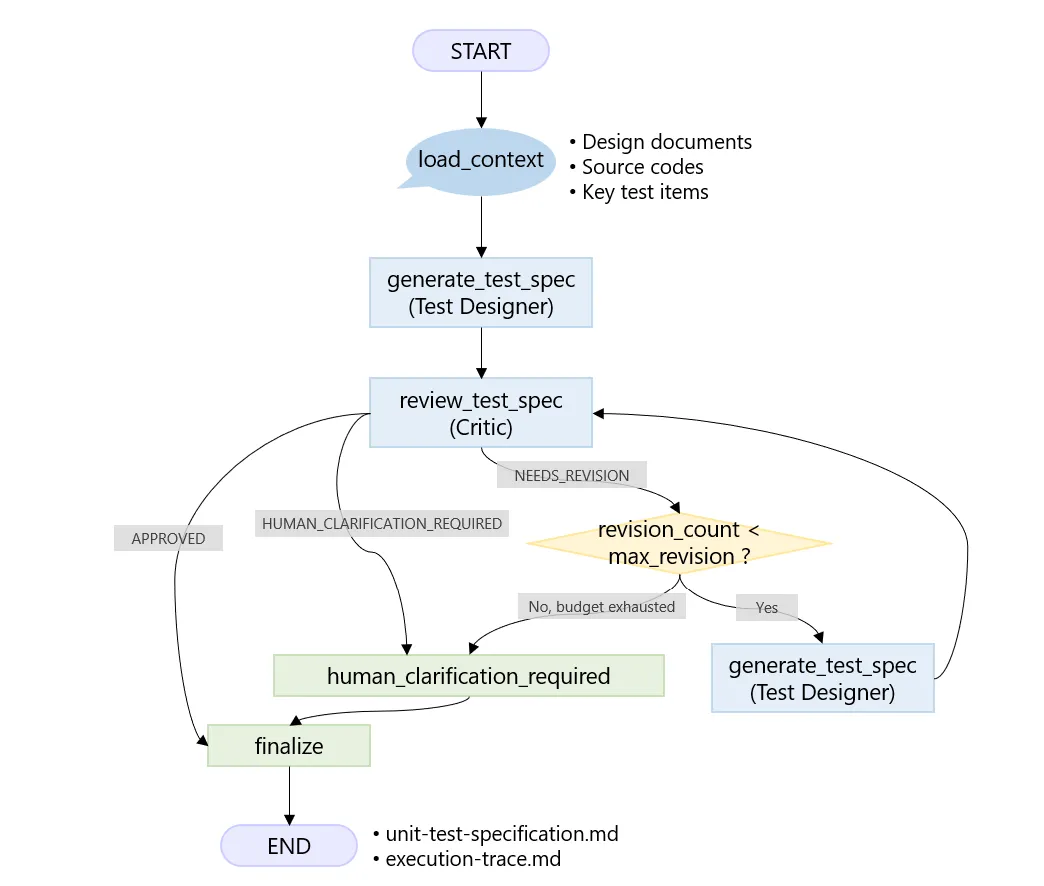
The complete flow from loading inputs to generating, reviewing, escalating, and writing the final artifacts.
Parallel Fan-Out/Gather focuses on running independent tasks in parallel and consolidating their results. Generator & Critic instead focuses on improving one artifact through repeated generation, review, and revision.
I used LangGraph because its state and conditional routing make this revision loop explicit.
This prototype deliberately excludes GitHub Pull Request and CI/CD integration. It reads three types of input from local files so that the experiment can focus on the review and revision flow and the quality of its output, rather than repository-specific integration.
📥 How the Three Inputs Are Used
1. Design Documents
The workflow assumes inputs such as high-level designs, system designs, and detailed design documents. These describe what the system is expected to achieve and which processes and constraints apply.
Real design documents do not always contain code-level details. A document might say only “add an order registration process,” while the implementation also contains input validation, duplicate checks, database updates, early returns, and error handling.
For that reason, a key policy is to avoid treating the design document as the only source of truth when generating the test specification.
2. Changed Source Code
The second input is the source code developed or modified in the change. The workflow is not tied to a particular language and can accept Python, Java, C#, JavaScript / TypeScript, SQL, YAML, JSON, and other formats.
Reading the code helps identify implementation conditions that may be absent from the design document, including:
- Conditional branches and early returns
- Upper limits, lower limits, empty values, and other boundary conditions
- Exception handling
- Database operations
- Configuration values
- Authentication behavior
- Timeouts and retries
However, behavior present in the code is not automatically treated as correct specification. If the design and code conflict, the discrepancy itself becomes something to review.
3. Developer-Authored Key Test Items
The third input is a short list of major test items prepared by the developer.
## Key Test Items

- A normal registration succeeds
- An error occurs when the email is missing
- A duplicate email cannot be registered
This input is not treated as a completed test specification. It represents the developer’s main scenarios while acknowledging that some coverage may still be missing.
Starting from those items, the Test Designer reads the design and changed code and supplements perspectives such as email-format validation, database registration failures, and early-exit conditions.
Use the developer’s key test items as a starting point, but do not treat them as the complete answer.
🤖 Responsibilities of the Test Designer and Critic
The Test Designer reads the three inputs and creates a draft test specification. Whenever possible, each test case records the information that justifies its inclusion.
| Test ID | Scenario | Expected result | Evidence |
|---|---|---|---|
| UT-001 | Normal registration | Registration succeeds | Design + Developer |
| UT-002 | Duplicate registration | A duplicate error occurs | Changed code |
| UT-003 | Input upper limit | The upper-limit value is accepted | Changed code |
The Evidence column identifies whether a case came from the design, changed code, or developer-authored key test items. The ability to trace a test case back to its source is traceability. Without an explanation of why an AI-added case is needed, the human review burden can increase rather than decrease.
The Critic reviews the draft from the following perspectives:
- Does it reflect the design document?
- Does it cover the major branches in the changed code?
- Is it overly anchored to the developer’s key test items?
- Is it biased toward happy-path scenarios?
- Are relevant error cases and boundary values missing?
- Are any expected results ambiguous?
- Does it overlook inconsistencies between the design and code?
- Does it add unrelated tests based on generic assumptions?
The review result is limited to three statuses:
- Approved (
APPROVED): Finalize the specification - Needs revision (
NEEDS_REVISION): Return it to the Test Designer - Human clarification required (
HUMAN_CLARIFICATION_REQUIRED): Stop guessing and organize the questions that require human judgment
🔁 Implementing the Review and Revision Flow with LangGraph
The implementation uses LangGraph’s StateGraph. Based on the Critic’s status and the number of revisions, it chooses among three actions: return the draft to the Test Designer, finalize the specification, or ask a human for clarification.
The decide_next_step() function determines the next action.
def decide_next_step(state, default_max_revisions):
    # Read the Critic's status, the revision limit, and the current revision count
    status = state["review_result"].status
    max_revisions = state.get(
        "max_revisions",
        default_max_revisions,
    )
    revision_count = state.get("revision_count", 0)

    # Finalize the artifact when the Critic approves it
    if status == "APPROVED":
        return "finalize"

    # Organize questions for a human when the AI cannot decide safely
    if status == "HUMAN_CLARIFICATION_REQUIRED":
        return "human_clarification_required"

    # Escalate to a human when the revision budget is exhausted
    if revision_count >= max_revisions:
        return "human_clarification_required"

    # Otherwise, return the draft to the Test Designer for revision
    return "revise_test_spec"
decide_next_step() is an independent function that looks only at the Critic’s status and the revision count. It can therefore be unit-tested using inputs and return values without starting the AI or the entire graph. The prototype also limits revisions to two so that repeated NEEDS_REVISION results cannot create an endless loop.
# Route to the next node based on the Critic's decision
graph.add_conditional_edges(
    "review_test_spec",
    route_after_review,
    {
        "finalize": "finalize",
        "human_clarification_required": "human_clarification_required",
        "revise_test_spec": "revise_test_spec",
    },
)

# Return to the Critic after a revision
graph.add_edge("revise_test_spec", "review_test_spec")

# Add human clarification details to the output, then finalize the artifact
graph.add_edge("human_clarification_required", "finalize")
The value of LangGraph is not simply that it can call two AI agents in sequence. It makes explicit which conditions trigger revision, when processing stops, and when judgment is returned to a human.
🛡️ Designing Workflow Guardrails
The workflow includes workflow guardrails that prevent an AI decision from passing through unchecked and protect against incorrect output or endless revisions. These are not safety filters for prohibited or harmful content. They control processing through review statuses, routing conditions, and a revision budget.
| Guardrail | Control | What it prevents |
|---|---|---|
| Limit review results to three statuses | Allow only Approved, Needs revision, or Human clarification required | Incorrect routing caused by an unexpected status |
| Do not guess when information is missing | Route insufficient evidence to human clarification | Test cases based on unsupported assumptions |
| Set a revision limit | Stop the loop after two revisions | Endless loops and uncontrolled growth in usage and latency |
| Make reviews converge | Separate blocking issues from advisory suggestions and pass review history to the Critic | Unnecessary revisions for minor issues and inconsistent criteria between rounds |
The following sections explain each guardrail.
Limit Review Results to Three Statuses
The Critic’s response schema allows only Approved, Needs revision, and Human clarification required. Unexpected values are rejected before routing, preventing ambiguous decisions from sending the workflow down an unintended path.
Do Not Guess When Information Is Missing
Suppose the following condition appears in SQL:
WHERE status IN (3, 5)If neither the design nor the parameter definitions explain the values, the business meaning of 3 and 5 cannot be determined from the code alone. Letting the AI infer their meaning could produce a plausible but incorrect test case.
When the Critic detects insufficient evidence, it returns Human clarification required. The workflow then records what the AI could not determine and what a person needs to confirm.
Set a Revision Limit
The workflow does not retry indefinitely when the Critic continues to return Needs revision. After two revisions, it stops the loop and returns the decision to a human. This prevents both endless processing and continued AI usage when improvement is no longer converging.
Make Reviews Converge
Treating every comment as equally important can produce repeated revisions for wording and formatting. The prototype classifies missing coverage and unsupported test cases as blocking issues, while duplicate cases and minor wording improvements are advisory suggestions. The draft returns to the Test Designer only when an unresolved blocking issue remains.
From the second review onward, the Critic also receives the previous review history. It first checks whether earlier issues were resolved and avoids turning test cases added in the last revision into new minor complaints or reversing an earlier requirement without evidence.
Design guardrails that reject unexpected decisions, prevent the agent from guessing when evidence is missing, make reviews converge, and keep evaluation criteria consistent.
⚙️ Managing Input and Output Files in config.yaml
The prototype manages input files and output destinations in config.yaml.
input:
  design_paths:
    - "input/design/**/*.md"
  source_paths:
    - "input/source/**/*"
  key_test_items:
    - "input/key-test-items.md"

output:
  test_specification:
    - "artifacts/unit-test-specification.md"
  trace:
    - "artifacts/execution-trace.md"
🔎 Recording the Execution Trace
The final unit test specification alone does not show how the workflow reached its result. The prototype records the execution order across input loading, specification generation, review, revision, and finalization.
START
→ load_context
→ generate_test_spec
→ review_test_spec
→ revise_test_spec
→ review_test_spec
→ finalize
→ END
It also saves the Critic’s status, rationale, issues, and human clarification questions in the review history and writes them to execution-trace.md.
This trace is more than operational logging. It provides evidence for checking whether a revision actually improved quality, whether the same issue was repeated, and whether escalation to a human was justified.
📊 Execution Results
The run used the following input and output files.
| Type | File | Description |
|---|---|---|
| Input | email.py | Email construction and sending with Azure Communication Email |
| Input | SendMailLogic-design.md | A short design describing plain-text and HTML content and sender/recipient configuration |
| Input | key-test-items.md | Three key test items written by the developer |
| Output | unit-test-specification.md | The generated unit test specification |
| Output | execution-trace.md | The executed node sequence and the Critic’s decision history |
Input and Output File Contents
Select a file name to view its contents. Long outputs can be scrolled inside the preview area. The Markdown previews are translated into English for this article; their structure and results are unchanged.
Input Files
email.py
import logging
from azure.communication.email import EmailClient
from shared.constants import Email


# Create email content
def _make_send_massage(subject: str, plain_text: str, html: str):
    """
    Create the email payload.
    Args:
        subject (str): Email subject
        plain_text (str): Plain-text email body
        html (str): HTML email body
    Returns:
        dict: Email payload
    """
    message = {
        "senderAddress": Email.FROM_ADDRESS.value,
        "recipients": {
            "to": [{"address": Email.TO_ADDRESS.value}],
        },
        "content": {"subject": subject, "plainText": plain_text, "html": html},
    }

    return message


# Send an HTML email
def send_htmlmail(subject: str, plain_text: str, html: str, email_conn_string: str):
    try:
        # Connect to the EmailClient service
        client = EmailClient.from_connection_string(email_conn_string)

        # Build the outgoing email
        message = _make_send_massage(subject=subject, plain_text=plain_text, html=html)

        poller = client.begin_send(message)
        poller.result()

        logging.info("Email sent successfully.")

    except Exception as ex:
        print(ex)
SendMailLogic-design.md
Design Document for the SendMail Function
Overview
Create a function that sends email using Azure Communication Email.
- Library: azure.communication.email
- Support both plain-text and HTML content
- Bind sender and recipient addresses through a custom constants class
- from shared.constants import Email
key-test-items.md
Key Test Items
- A normal registration succeeds
- An error occurs when the email is missing
- A duplicate email cannot be registered
Output Files
unit-test-specification.md
Unit Test Specification
Scope of the Change
- Source file:
input\source\email.py - Summary: A function was added to send email through Azure Communication Email. The outgoing message uses constant sender and recipient addresses and contains a subject, plain-text body, and HTML body. The entire send operation is wrapped in exception handling.
Developer-Provided Key Test Items
- A normal registration succeeds
- An error occurs when the email is missing
- A duplicate email cannot be registered
Test Cases
| ID | Category | Scenario | Preconditions | Input | Expected result | Evidence |
|---|---|---|---|---|---|---|
| UT-001 | Happy path | Verify that specifying a subject, plain-text body, and HTML body creates a valid email message with the constant sender and recipient addresses. | Email.FROM_ADDRESS.value and Email.TO_ADDRESS.value are available. | Call _make_send_massage(subject='Subject', plain_text='Plain body', html='<p>HTML body</p>'). | The result is a dict; senderAddress equals Email.FROM_ADDRESS.value; recipients.to[0].address equals Email.TO_ADDRESS.value; and the subject, plain-text body, and HTML body match the inputs. | Design + Code |
| UT-002 | Happy path | Verify that a valid connection string and message run the email send operation to completion. | EmailClient.from_connection_string, begin_send, and poller.result can be mocked. | Call send_htmlmail(subject='Subject', plain_text='Plain body', html='<p>HTML body</p>', email_conn_string='valid-connection-string'). | EmailClient.from_connection_string is called once with the connection string; begin_send is called once with the generated message; poller.result is called once; and no exception is raised. | Design + Code + Human Key Test Item |
| UT-003 | Happy path | Verify that a success log is written after an email is sent. | logging.info and the EmailClient calls can be mocked so the send succeeds. | Call send_htmlmail(subject='Subject', plain_text='Plain body', html='<p>HTML body</p>', email_conn_string='valid-connection-string'). | logging.info is called once with Email sent successfully. (Note: The success log is implementation behavior and is not specified in the design document.) | Code |
| UT-004 | Error case | Verify that an exception raised while creating EmailClient for an empty connection string is caught and not re-raised. | EmailClient.from_connection_string can be mocked to raise an exception, and print can be mocked. | Call send_htmlmail(subject='Subject', plain_text='Plain body', html='<p>HTML body</p>', email_conn_string=''). | No exception reaches the caller, and the exception object or its content is passed to print. (Note: The human test item “an error occurs when the email is missing” can be interpreted as an empty connection string, but the design does not define this behavior.) | Code + Human Key Test Item |
| UT-005 | Error case | Verify that an exception from begin_send is caught and not re-raised. | EmailClient.from_connection_string returns a client, client.begin_send can be mocked to raise, and print can be mocked. | Call send_htmlmail(subject='Subject', plain_text='Plain body', html='<p>HTML body</p>', email_conn_string='valid-connection-string'). | No exception reaches the caller; client.begin_send is called once; and the exception object or its content is passed to print. | Code |
| UT-006 | Error case | Verify that an exception from poller.result is caught and not re-raised. | EmailClient.from_connection_string and client.begin_send succeed, poller.result can be mocked to raise, and print can be mocked. | Call send_htmlmail(subject='Subject', plain_text='Plain body', html='<p>HTML body</p>', email_conn_string='valid-connection-string'). | No exception reaches the caller; poller.result is called once; and the exception object or its content is passed to print. | Code |
| UT-007 | Boundary value | Verify that empty subject, plain-text body, and HTML body values are preserved by the message builder. | Email.FROM_ADDRESS.value and Email.TO_ADDRESS.value are available. | Call _make_send_massage(subject='', plain_text='', html=''). | content.subject, content.plainText, and content.html are empty strings, while the sender and recipient addresses retain their constant values. (Note: Required-field validation is not implemented, so this test documents the current preservation behavior.) | Code |
Implementation Notes
- The recipient and sender addresses are fixed in the
Emailconstants rather than passed as function arguments. Environment-specific replacement and test handling therefore require attention. send_htmlmailcatches a broadException, prints it instead of logging it, and returns. This makes failures difficult for the caller to detect.- Real Azure Communication Email calls depend on
EmailClient.from_connection_string,begin_send, andpoller.result, so unit tests must mock those calls.
Design / Code Differences
- The design says to support both plain-text and HTML content, but it does not define the behavior for missing or empty input. The implementation performs no validation and places the values directly into the message.
- The design does not specify error-handling behavior for send failures. The implementation catches every exception, prints it, and does not re-raise it.
- The human test item “a duplicate email cannot be registered” does not match the change because the design and code implement email sending, not registration or duplicate detection.
- The human test item “an error occurs when the email is missing” does not match an implementation in which sender and recipient addresses come from constants, and the design does not identify which email input it refers to.
Items Requiring Human Clarification
None.
execution-trace.md
Execution Trace
This diagnostic record lists the nodes actually traversed by LangGraph and the Critic’s rationale at each stage. See the separately generated unit test specification for the artifact itself.
Execution Route
Route: START -> load_context -> generate_test_spec -> review_test_spec -> finalize -> END
Critic Review Cycle
Review 1
- Decision: APPROVED
- Rationale: The draft covers the major behavior in the design and changed code, with no unresolved critical coverage gaps. It also addresses the inconsistencies in the human-authored test items explicitly, so it can be approved.
- Issues:
[redundant_test](Test case: UT-004) UT-004 interprets the human test item “an error occurs when the email is missing” as an empty connection string. This is not a direct requirement in the design or implementation, and its exception-handling perspective overlaps with UT-005 and UT-006. It may remain, but traceability would be clearer if the tests were organized around exception points supported directly by the code. [Evidence:input/source/email.py,input/design/SendMailLogic-design.md]
- Clarification questions: None
Human-in-the-Loop Escalation
No Human-in-the-Loop escalation occurred in this run.
In the first run, the workflow reached the maximum of two revisions even though the target was a simple email-sending program. Because review and revision did not terminate as expected, I analyzed the execution trace and the Critic’s decisions. I then separated the Critic’s findings into blocking issues and advisory suggestions and passed previous review history into later rounds. The table compares the first run with the rerun using the same inputs.
| Metric | First run | Rerun |
|---|---|---|
| Critic review count | 3 | 1 |
| Test Designer revision count | 2 | 0 |
| Human clarification | Yes | No |
| Final status | Revision limit reached | Approved (APPROVED) |
| Generated test cases | 8 | 7 |
| Estimated AI calls (*) | 6 | 2 |
⚠️ Estimated AI calls: An approximation assuming one AI call per processing step and no retry caused by a communication error.
🔎 Results, Analysis, and Iteration
In short, the prototype could identify test perspectives, but it is not yet ready for direct production use as a system that completes unit test specifications autonomously.
Why the First Review Did Not Finish
In the first run, the Critic returned Needs revision three times. Even after the Test Designer addressed a finding, the criteria shifted in the next round and produced a new issue.
- A case added during revision was classified as a duplicate in the next review
- The expected granularity between a public operation and its internal processing changed between rounds
- The Critic was inconsistent about whether error handling should be tested at each failure point or as one representative case
This showed that simply assembling a Generator & Critic Pattern does not guarantee steady quality improvement.
Revising the Critic’s Return Conditions
Minor suggestions were also triggering a return to the Test Designer. I therefore classified missing coverage and unsupported cases as findings that require revision, while duplicates and wording improvements became advisory suggestions. I also passed previous review history to the Critic to reduce contradictions with earlier findings.
In the rerun, revisions fell from two to zero, estimated AI calls fell from six to two, and the workflow ended after the first review. Because the first review immediately returned Approved, however, the cross-round consistency check based on review history was not exercised. The rerun primarily demonstrated the effect of separating blocking findings from advisory suggestions.
Quality Issues Remained After Approval
The rerun’s specification still had the following problems:
- It used key test items that did not match the email-sending change as evidence
- It reinterpreted “missing email” as “missing connection string”
- Expected results for error cases were too ambiguous to define concrete pass/fail criteria
These weak reinterpretations could be treated as unsupported assumptions and made blocking. An Approved status means only that the artifact passed the configured criteria; it does not guarantee that the specification is correct.
Cost Effectiveness Was Not Evaluated
I did not measure AI usage, execution time, or pricing. Although the estimated call count fell by two-thirds, the experiment cannot show how much latency or cost was reduced. Processing efficiency and output quality need to be measured under the same conditions and compared with the human review effort.
🧪 Testing a Multi-Agent Workflow
Production use requires separate tests for graph routing, each agent’s expected role, and the complete path from inputs to the final output. This article focuses on implementing the Generator & Critic Pattern and examining its results.
I will cover test design for Multi-Agent workflows as a separate topic in a future article.
⚠️ What to Watch for with Generator & Critic
The Critic Is Not Automatically Correct
Adding a Critic does not guarantee quality. The Generator and Critic may share the same assumptions and overlook the same problem. The Critic itself should be evaluated with both defective and acceptable drafts to confirm that it can distinguish between them.
More Revisions Are Not Always Better
Each revision increases AI usage, cost, and latency. If the real problem is missing information, repeating the loop will not solve it. A bounded number of attempts followed by human judgment is more rational.
Do Not Treat AI Output as the Final Artifact
This workflow does not automatically authorize a unit test specification for production use. AI supports coverage discovery and draft improvement; a human remains responsible for the final decision.
Conclusion
The prototype identified useful test perspectives and discrepancies between the design and code. Revising the Critic’s return conditions made the workflow finish earlier, but weakly supported cases remained even after approval. The improvement was mainly in convergence, not guaranteed quality.
This experiment was close to zero-shot: it asked the agents to reason from the design and code without giving them exemplary specifications. A stronger next step is to retrieve previously approved test specifications, review records, and defect cases with Hybrid Search, then pass similar examples to the Test Designer and Critic as few-shot samples. This would bring the organization’s accumulated test knowledge and evaluation criteria into both generation and review.
Retrieved content is not automatically correct either. It should be filtered by system, version, and feature; recent approved documents should be preferred; and the specification should retain its sources. Output quality, AI usage, and human review effort can then be compared to evaluate cost effectiveness.
Instead of continuing to tune a zero-shot workflow, retrieve exemplary cases with Hybrid Search and provide them as few-shot samples so that accumulated testing knowledge can improve quality.
Source Code
The code used in this article is available in the multi-agent/langgraph-test-spec-generator/ directory of the GitHub repository.